
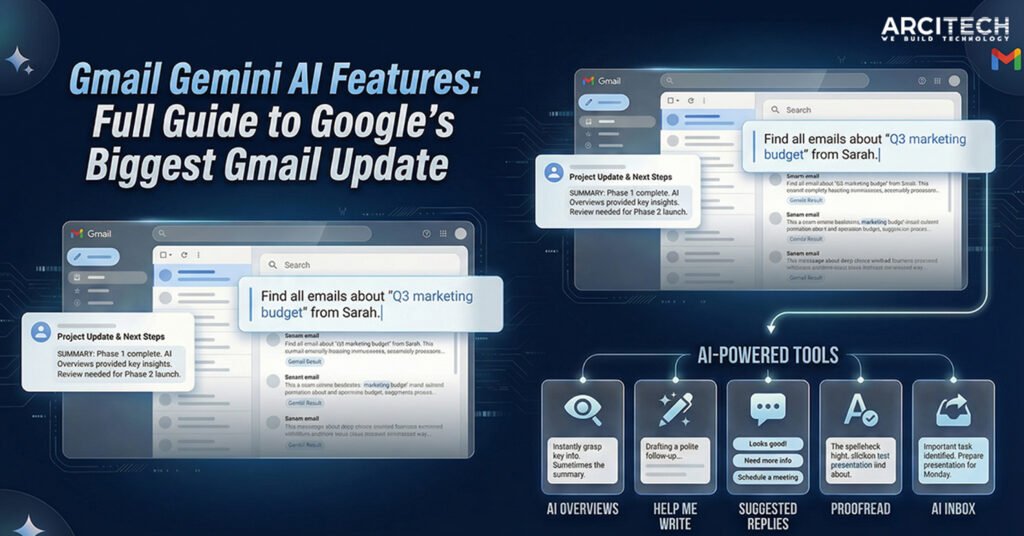
The Gmail Gemini AI features mark the biggest transformation of Gmail in more than 20 years. With over 3 billion users worldwide, Gmail is no longer just an email service it is becoming an intelligent assistant that helps users manage information, not just messages. Google’s new Gemini-powered update introduces AI summaries, smart replies, writing assistance, inbox organization, and task tracking, all designed to make email faster, simpler, and more useful.
With inboxes more crowded than ever, the Gmail Gemini AI features aim to solve a problem almost everyone faces: too many emails, too little time, and important details buried deep inside long conversations.
What Are Gmail Gemini AI Features?
Gmail Gemini AI features are a set of artificial intelligence tools powered by Google’s Gemini AI that help users read, write, summarize, organize, and manage emails more efficiently inside Gmail.
Instead of searching through long threads or manually writing every reply, Gmail now uses Gemini AI to:
- Summarize long email conversations
- Suggest context-aware replies
- Help users write or refine emails
- Highlight important messages and tasks
- Answer questions directly from your inbox
This update moves Gmail from a traditional email app to a personal information assistant.
Why Google Is Reworking Gmail Now
Gmail launched in 2004 and completely changed how people used email. But email itself has changed dramatically since then.
Email Volume Is at an All-Time High
Today, people receive:
- Work emails
- School notifications
- Bills and receipts
- Travel updates
- Promotions and newsletters
Important information is often hidden inside long email threads. Google says users now spend more time managing email than actually responding to it.
The Gmail Gemini AI features are designed to fix this problem by turning information into instant answers.
Sundar Pichai’s “Gemini Era” Vision
Google CEO Sundar Pichai described the update as “bringing Gmail into the Gemini era.” The goal is simple: make Gmail proactive instead of reactive.
We launched Gmail on April Fool’s Day in 2004. 20+ years later, we’re bringing Gmail into the Gemini era.
— Sundar Pichai (@sundarpichai) January 8, 2026
AI Overviews, Suggested personalized replies, Proof read, AI Inbox with new streamlined views and suggested topics to catch-up on and loads more, read the full details…
Rather than forcing users to search, scroll, and read everything manually, Gmail now understands context and delivers what matters most.
Gmail’s 3 Billion Users: Why This Update Matters Globally
Gmail has more than 3 billion active users, making it one of the most widely used digital products in the world. Any major change to Gmail instantly affects people across:
- Workplaces
- Schools and universities
- Small businesses
- Families and individuals
Because of this massive reach, the Gmail Gemini AI features could shape how billions of people interact with email and AI every single day.
Google is also using this scale as a competitive advantage against companies like OpenAI and Anthropic by embedding AI directly into tools people already use.
Gmail AI Overviews: The Most Important New Feature
What Are AI Overviews in Gmail?
AI Overviews are Gemini-powered summaries that automatically condense long email conversations into short, clear highlights.
When you open an email thread with dozens of replies, Gmail now:
- Reads the entire conversation
- Identifies key points and decisions
- Presents a concise summary at the top
This is one of the most powerful Gmail Gemini AI features because it saves time instantly.
How Gmail Summarizes Long Email Threads
Imagine a long office email chain discussing deadlines, feedback, and decisions. Instead of reading every reply, Gmail shows you:
- What was decided
- Who needs to act
- Any unresolved points
This works for work emails, group chats, family conversations, and planning discussions.
Asking Gmail Questions in Plain Language
Another major upgrade is the ability to ask your inbox questions, such as:
- “Who sent me the electrician quote last year?”
- “What did my manager decide about the project deadline?”
Gmail uses Gemini AI to answer directly instead of showing a list of emails.
Note:
- Email summaries are free for everyone
- Question-and-answer search is available for Google AI Pro and Ultra subscribers
Gmail’s New AI Writing Tools Explained
The Gmail Gemini AI features also focus heavily on helping users write better emails with less effort.
Help Me Write: Draft Emails Faster
“Help Me Write” allows users to:
- Draft emails from scratch
- Rewrite messages more clearly
- Adjust tone (formal, friendly, short, detailed)
You can give simple prompts like:
- “Write a polite follow-up email”
- “Make this email sound more professional”
This feature is available to all users at no cost.
Suggested Replies: Smarter Than Smart Replies
Suggested Replies is an upgraded version of Gmail’s older Smart Replies feature.
Now, Gemini AI:
- Understands the full conversation
- Matches your writing style
- Suggests natural, one-click replies
For example, if someone asks a question in a family group chat, Gmail can suggest a reply that sounds like something you would actually say.
This makes Suggested Replies one of the most practical Gmail Gemini AI features for daily use.
Proofread: Cleaner, More Polished Emails
The Proofread feature helps users:
- Fix grammar mistakes
- Improve clarity
- Adjust tone and style
It’s especially useful for work emails, applications, and formal communication.
Availability:
- Basic writing tools are free
- Advanced Proofread is limited to AI Pro and Ultra subscribers
Gmail’s New AI Inbox: Your Personal Email Briefing
What Is the AI Inbox?
The AI Inbox acts like a daily briefing for your email.
Instead of showing emails in chronological order, Gmail highlights:
- Important messages
- Tasks and deadlines
- Bills and reminders
The goal is to reduce inbox overload and help users focus on what truly matters.
How AI Inbox Decides What’s Important
Gmail analyzes signals such as:
- People you email frequently
- Contacts saved in your address book
- Message content and urgency
This allows important items like a bill due tomorrow or a meeting reminder to appear first.
Privacy and Data Protection
Google emphasizes that:
- AI analysis happens securely
- User data remains under user control
- Gmail’s existing privacy protections remain in place
Privacy is a key concern with AI, and Google says these Gmail Gemini AI features are built with security at their core.
Free vs Paid Gmail Gemini AI Features
| Feature | Free Users | AI Pro / Ultra |
| Email thread summaries | ✅ Yes | ✅ Yes |
| Help Me Write | ✅ Yes | ✅ Yes |
| Suggested Replies | ✅ Yes | ✅ Yes |
| Ask inbox questions | ❌ No | ✅ Yes |
| Advanced Proofread | ❌ No | ✅ Yes |
When and Where Are Gmail Gemini AI Features Available?
- Rolling out in phases
- Initially available in English
- Launching first in the US
- More languages and regions coming later
Mobile and desktop support will expand as the rollout continues.
Gmail vs Other AI Email Tools
While other email platforms offer AI features, Gmail’s approach is different because:
- AI is built directly into the inbox
- No third-party tools required
- Gemini understands your full email history
This gives Gmail a strong advantage in delivering useful, context-aware AI assistance.
What Gmail Gemini AI Features Mean for Everyday Users
For Students
- Faster replies to professors
- Clear summaries of group emails
- Less time managing inbox clutter
For Working Professionals
- Quicker understanding of long threads
- Polished emails with less effort
- Better task tracking
For Business Owners
- Faster communication
- Fewer missed deadlines
- More organized inboxes
For Families and Personal Use
- Easier planning
- Clear summaries of group conversations
- Less stress from email overload
Google, AI Competition, and the Bigger Picture
The Gmail update is part of Google’s larger AI strategy as it competes with OpenAI and Anthropic. By embedding Gemini into everyday products, Google is making AI accessible without requiring users to learn new tools.
This strategy has also boosted investor confidence, helping Google’s parent company Alphabet reach major market milestones.
Frequently Asked Questions (FAQ)
What are Gmail Gemini AI features?
Gmail Gemini AI features are AI-powered tools that help users summarize emails, write messages, organize inboxes, and find information using natural language.
Are Gmail Gemini AI features free?
Many features, including summaries and writing tools, are free. Advanced features require Google AI Pro or Ultra subscriptions.
Can I turn off Gemini AI in Gmail?
Yes, some Gemini AI features are enabled by default, but users can opt out in Gmail settings.
Does Gmail AI read my emails?
Gmail uses AI to analyze email content securely to provide features like summaries and suggestions, while maintaining privacy protections.
When will Gmail Gemini AI features come to India?
Google plans to expand availability to more regions and languages later this year.
Final Thoughts: Gmail Is Entering a New Era
The Gmail Gemini AI features represent a major shift in how email works. Gmail is no longer just a place to read messages, it is becoming an intelligent assistant that helps users manage information, time, and tasks more effectively.
For the world’s 3 billion Gmail users, this update could change daily digital life in a very real way.